Personal Plain Text Accounting
I read Your Money or Your Life when I was younger and the idea stuck with me. I’ve been tracking my finances ever since.
Paper was great at first. Tangible. Then I moved to spreadsheets and dabbled in accounting software.
I encourage you to read the book if you haven’t and want to be more mindful of your spending.
I recently evolved this by building a personal accounting app.

You might want to use this if you’re curious about tracking personal finances with simple accounting tools that are free, keep all your data local, and help you learn.
Or use it as a base to build something customized to your own wants. It’s never been easier to build your own tools.
I wanted all the data to be plain text, so I landed on hledger as the underlying software. I also wanted it to be designed to help me grasp accounting concepts by doing accounting with my own finances.
Accounting with your own finances
Double-entry bookkeeping is a useful way to think about money movement. There’s an underlying math simplicity to it, but still enough complexity to deter folks who just want to track their personal finances. A hurdle to get over.
The math idea is that this equation always stays balanced as money moves:
Assets = Liabilities + Equity + (Income - Expenses)Transactions move two or more of these variables up or down
Getting paid can be an increase in Income:salary and Assets:checking. Both sides increase in positive numbers.
Buying groceries with a credit card is an increase in Expenses:food:groceries and Liabilities:credit-card. The expense being negative in the equation balances the positive liabilities on the right side.
It takes time and energy to get the subaccounts you want and map all the transactions to the right places, but that’s where software can help out.
Plaintext Personal Ledger
I built Plaintext Personal Ledger because I liked hledger, but felt like the UI could do a lot more for users. I also wanted to learn accounting concepts better myself.
The goal is you can start using it today, and the accounting part will make sense as you go along.
Plaintext refers to your data being stored in .journal files, which are formatted text files on your machine.
A single transaction could look like this:
2026-03-15 Farmers Market
    expenses:food:groceries    $42.50
    assets:cash
A date, a description, and two accounts — hledger infers the last account’s amount. (In this case -$42.50 to assets:cash)
A few more might look like:
2026-03-01 Mortgage
    expenses:housing:mortgage       $1,900.00
    assets:checking

2026-03-01 Paycheck
    assets:checking                 $3,200.00
    income:salary

2026-03-03 Super Foods
    expenses:food:groceries         $87.32
    liabilities:credit-card

2026-03-05 Electric company
    expenses:housing:utilities      $64.20
    assets:checking
Simple formatted files. No database, no outside systems. You can open these in a text editor, search them, edit them directly, track changes with git, and generally have full control over it.
You don’t need to interact with the files directly, Plaintext Personal Ledger handles everything, but it’s there.
The web UI
The app’s interface is designed to make the accounting concepts visible alongside the numbers. Or you can turn off the help to simplify the UI.
For example, a transaction detail will show you:
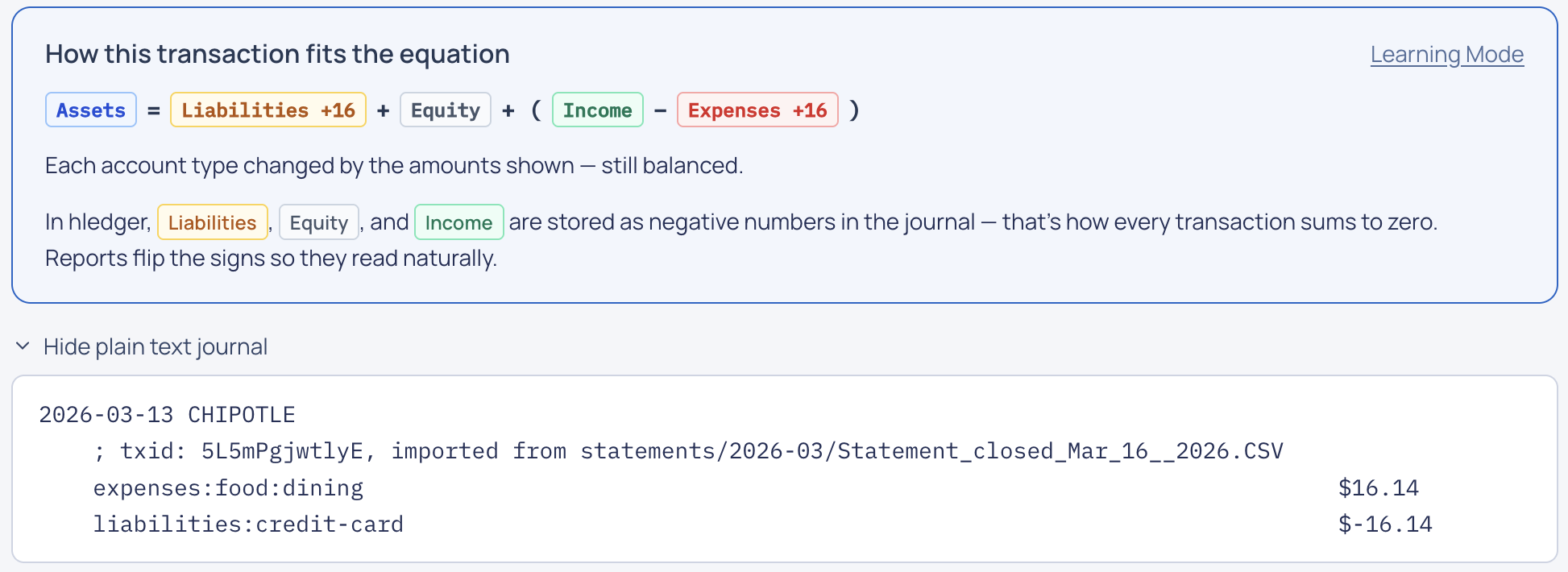
This breaks down how each transaction fits the accounting equation. It shows which accounts changed by how much.
You’ll want it automated
hledger can consume statements and create transactions from them. The workflow is:
- “Upload” it into the app (everything is always local on your machine, it just organizes the uploads or associates them with transactions locally).
- Use the statement to generate a
.rulesfile. This is the start of a mapping between transaction strings and the accounts it should be assigned to. - Assign accounts to each new transaction or use the default, like
Expenses:unknown
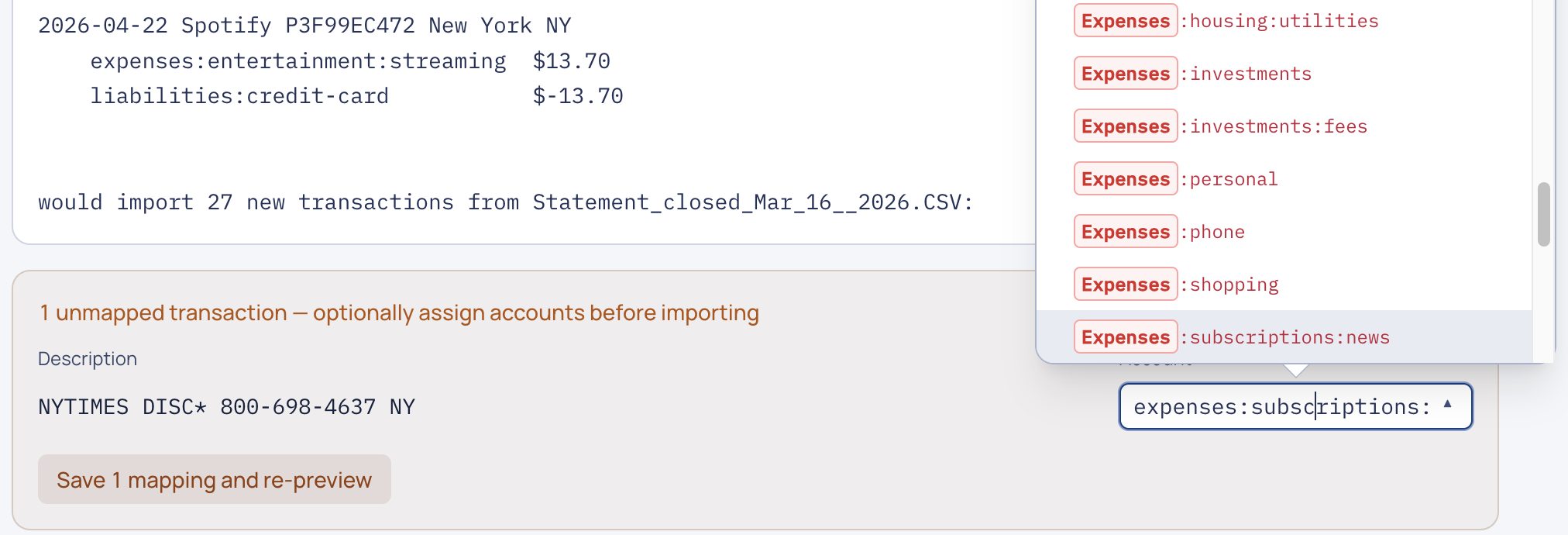
It’s up to you what you want to track as subaccounts of the main accounts (Assets, Liabilities, Equity, Income, Expenses).
This has been the time-consuming part starting out. Each transaction has a short description and you’ll want to map it to a subaccount. You’re free to create any subaccounts you want to categorize things into.
Each time you choose a mapping for a transaction, it will create a rule to match future transactions like it to the same account. It also offers suggestions. A lot of the time it’s just 1 click if a rule doesn’t exist and it gets easier each month.
Plaintext files
Your plain text .journal files can be read, copied, version controlled, or looked at with an agent when you want to understand something better.
try it out or build something with it for yourself.